Computing Snow Accumulation from the December 2025 Illinois Winter Storm#
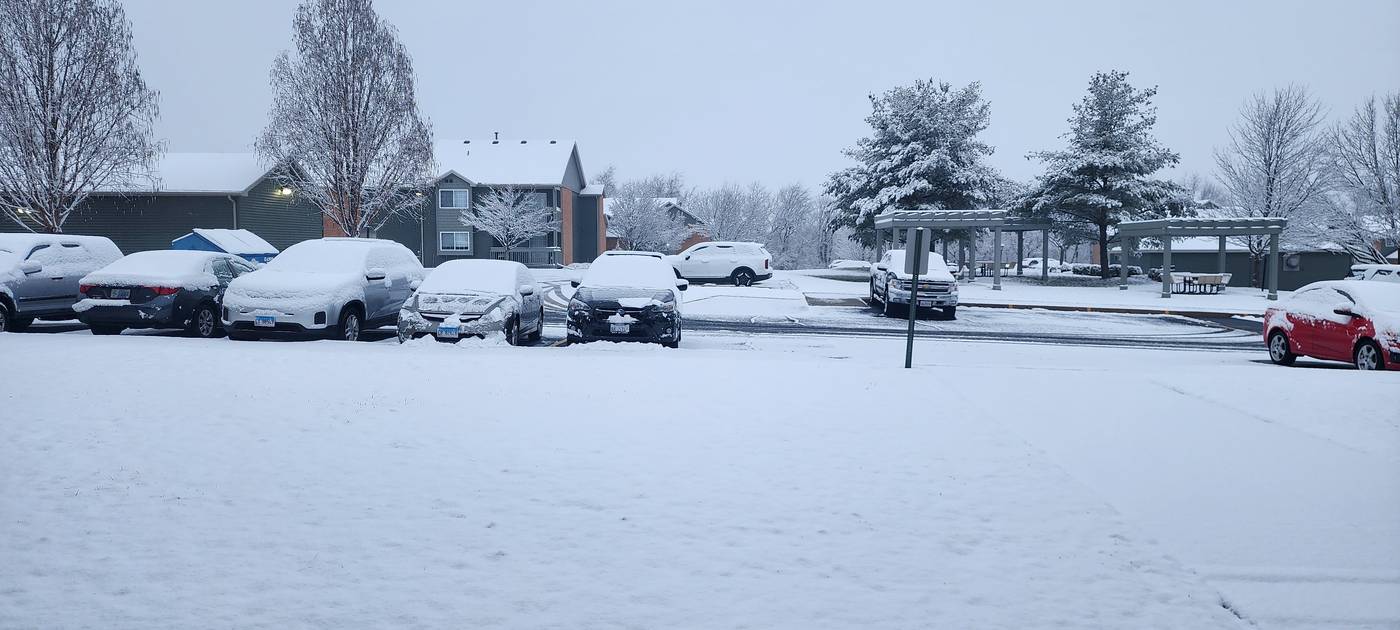
Photo: A. Ladino-Rincon
The Storm: December 13-14, 2025#
A powerful winter storm moved through the Midwest, bringing heavy snowfall to northern Illinois. The NEXRAD radar at KLOT (Chicago) captured the entire event in real-time (see Notebook 1 for KLOT’s geographic coverage).
Storm Timeline:
December 13, 12:00 UTC: Snow begins spreading across northern Illinois
December 13, 18:00 UTC: Peak intensity, with heavy snowfall rates
December 14, 00:00 UTC: Snow continues, gradually tapering off
December 14, 06:00 UTC: Storm exits the region
import sys
import warnings
from pathlib import Path

warnings.filterwarnings("ignore", category=FutureWarning)

# Ensure demo_functions is importable (needed when executed from docs/)
sys.path.insert(0, str(Path("../notebooks").resolve()))

# Geographic visualization
import cartopy.crs as ccrs
import cartopy.feature as cfeature

# Radar-specific tools
import cmweather  # noqa: F401 - Radar colormaps
import icechunk as ic
import matplotlib.pyplot as plt
import numpy as np
import xarray as xr
from demo_functions import concat_sweep_across_vcps, rain_depth

print(f"xarray version: {xr.__version__}")
print(f"icechunk version: {ic.__version__}")
xarray version: 10000.dev6383+g8cf3ad708
icechunk version: 2.0.0a0
# Radar location (for reference in later calculations)
klot_lat = 41.6044
klot_lon = -88.0847
QPE Fundamentals: From Radar Reflectivity to Snow Depth#
The Challenge#
Weather radar measures reflectivity (Z), which tells us how much energy bounces back from precipitation particles. But what we want to know is how much snow fell - that requires converting Z into precipitation rate ®, then accumulating over time.
The Z-R Relationship#
The fundamental equation relating reflectivity to precipitation rate is:
Where:
Z: Radar reflectivity (in linear units, not dBZ)
R: Precipitation rate (mm/hr)
a, b: Empirical coefficients that depend on precipitation type
Rearranging to solve for R:
Important
The key insight: Different precipitation types have different Z-R relationships because particle size, shape, and density vary.
Rain: Dense, uniform drops with predictable size distributions
Snow: Low-density aggregates with highly variable shapes
Rain vs Snow Coefficients#
Here are the empirical coefficients we’ll use:
Precipitation Type |
a |
b |
Reference |
|---|---|---|---|
Rain (Marshall-Palmer) |
200 |
1.6 |
Marshall & Palmer (1948) |
Snow (WSR-88D default) |
75 |
2.0 |
Marshall-Gunn (1958) |
Note
Why these coefficients? The WSR-88D (NEXRAD) operational snow algorithm uses a=75, b=2.0, which is based on Marshall & Gunn (1958). This relationship is well-validated for aggregate snow in the midlatitudes and gives reasonable accumulation estimates.
Tip
Z-S relationships vary widely! Values of ‘a’ range from 40 to 2000 in the literature. The WSR-88D default (a=75) is a good middle ground for typical winter storms. For specific storm types, different relationships may be more appropriate.
From Rates to Accumulation#
Once we have precipitation rate (mm/hr), we need to integrate over time to get total accumulation (mm):
Where:
\(R_i\): Precipitation rate at time step i
\(\Delta t_i\): Time interval between scans (typically 4-6 minutes for NEXRAD)
The rain_depth() function in demo_functions.py handles this automatically by:
Converting reflectivity from dBZ to linear units
Applying the Z-R relationship
Integrating over the
vcp_timedimension
Note
Liquid equivalent vs actual snow depth
The output is in liquid equivalent (mm of water if the snow melted). To convert to actual snow depth, use the snow-to-liquid ratio (SLR):
Typical SLR values:
Wet, heavy snow: 5:1 to 10:1
Average: 10:1 to 15:1
Dry, fluffy snow: 15:1 to 30:1
We’ll use 10:1 (a conservative estimate) for this storm.
Accessing the Storm Data#
Now let’s connect to the KLOT radar archive and load the December 13-14 storm data.
Step 1: Connect to Icechunk Repository#
%%time
# Connect to KLOT data on Open Storage Network
storage = ic.s3_storage(
    bucket="nexrad-arco",
    prefix="KLOT-RT",
    endpoint_url="https://umn1.osn.mghpcc.org",
    anonymous=True,
    force_path_style=True,
    region="us-east-1",
)

# Open repository and create read-only session
repo = ic.Repository.open(storage)
session = repo.readonly_session("main")

print("Connected to KLOT radar archive")
Connected to KLOT radar archive
CPU times: user 42.8 ms, sys: 8.76 ms, total: 51.6 ms
Wall time: 359 ms
Step 2: Open DataTree#
%%time
# Open DataTree (lazy loading)
dtree = xr.open_datatree(
    session.store,
    zarr_format=3,
    consolidated=False,
    chunks={},
    engine="zarr",
    max_concurrency=5,
)

print(f"DataTree opened: {dtree.nbytes / 1024**3:.1f} GB total")
print(f"Available VCPs: {sorted(dtree.children)}")

# Show xarray's beautiful Dataset representation
dtree["VCP-34/sweep_0"].ds
DataTree opened: 94.2 GB total
Available VCPs: ['VCP-34']
CPU times: user 609 ms, sys: 119 ms, total: 728 ms
Wall time: 2.09 s
<xarray.DatasetView> Size: 17GB
Dimensions:            (vcp_time: 638, azimuth: 720, range: 1832)
Coordinates:
  * vcp_time           (vcp_time) datetime64[ns] 5kB 2025-12-08T21:04:51 ... ...
  * azimuth            (azimuth) float64 6kB 0.25 0.75 1.25 ... 359.2 359.8
    elevation          (azimuth) float64 6kB dask.array<chunksize=(720,), meta=np.ndarray>
    time               (azimuth) datetime64[ns] 6kB dask.array<chunksize=(720,), meta=np.ndarray>
  * range              (range) float32 7kB 2.125e+03 2.375e+03 ... 4.599e+05
    x                  (azimuth, range) float64 11MB dask.array<chunksize=(180, 458), meta=np.ndarray>
    z                  (azimuth, range) float64 11MB dask.array<chunksize=(180, 458), meta=np.ndarray>
    y                  (azimuth, range) float64 11MB dask.array<chunksize=(180, 458), meta=np.ndarray>
    altitude           int64 8B ...
    crs_wkt            int64 8B ...
    latitude           float64 8B ...
    longitude          float64 8B ...
Data variables:
    CCORH              (vcp_time, azimuth, range) float32 3GB dask.array<chunksize=(1, 720, 1832), meta=np.ndarray>
    DBZH               (vcp_time, azimuth, range) float32 3GB dask.array<chunksize=(1, 720, 1832), meta=np.ndarray>
    ZDR                (vcp_time, azimuth, range) float32 3GB dask.array<chunksize=(1, 720, 1832), meta=np.ndarray>
    PHIDP              (vcp_time, azimuth, range) float32 3GB dask.array<chunksize=(1, 720, 1832), meta=np.ndarray>
    RHOHV              (vcp_time, azimuth, range) float32 3GB dask.array<chunksize=(1, 720, 1832), meta=np.ndarray>
    sweep_fixed_angle  (vcp_time) float32 3kB dask.array<chunksize=(1,), meta=np.ndarray>
sweep_number (vcp_time) float64 5kB dask.array<chunksize=(1,), meta=np.ndarray>Handling Multi-VCP Data: The Continuous Storm Challenge#
The Problem#
During a storm, the radar automatically switches between different Volume Coverage Patterns (VCPs) based on weather conditions:
Timeline:
├─ 12:00 UTC: VCP-34 (clear air mode)
├─ 14:00 UTC: VCP-212 (precipitation mode) ← Radar detects intensifying storm
├─ 18:00 UTC: VCP-35 (severe weather mode) ← Peak intensity
└─ 22:00 UTC: VCP-212 (precipitation mode) ← Storm weakens
Each VCP has its own hierarchical branch in the DataTree. If we only load one VCP, we’d have gaps in our time series.
Warning
Common mistake: Computing accumulation from a single VCP will underestimate total snowfall because you’re missing entire time periods when other VCPs were active.
The Solution: Concatenate Across VCPs#
The concat_sweep_across_vcps() function (from demo_functions.py) solves this by:
Finding all VCP nodes in the DataTree
Extracting the same sweep (e.g.,
sweep_0) from each VCPConcatenating them along the
vcp_timedimensionSorting by time to create a continuous time series
# Example usage
continuous_data = concat_sweep_across_vcps(
    dtree,
    sweep_name="sweep_0",  # Lowest elevation angle
    append_dim="vcp_time",
    sort_by_time=True       # Ensure chronological order
)
Tip
Why sweep_0?
For QPE (precipitation accumulation), we use the lowest elevation sweep (sweep_0) because:
It’s closest to the ground (where we want to measure accumulation)
All VCPs include sweep_0, ensuring compatibility
Higher sweeps sample the atmosphere aloft, not surface precipitation
Step 3: Create Continuous Time Series#
Let’s concatenate sweep_0 across all VCPs to create an uninterrupted storm record:
%%time
# Concatenate sweep_0 across all VCPs
sweep_0_continuous = concat_sweep_across_vcps(
    dtree,
    sweep_name="sweep_0",
    append_dim="vcp_time",
    validate_coords=True,  # Verify spatial compatibility
    sort_by_time=True,  # Chronological order
)

print("Continuous dataset created")
print(
    f"Time span: {sweep_0_continuous.vcp_time.min().values} to {sweep_0_continuous.vcp_time.max().values}"
)
print(f"Number of scans: {len(sweep_0_continuous.vcp_time)}")
print(f"Variables: {list(sweep_0_continuous.data_vars)}")
Continuous dataset created
Time span: 2025-12-08T21:04:51.000000000 to 2025-12-14T01:15:42.000000000
Number of scans: 638
Variables: ['CCORH', 'DBZH', 'ZDR', 'PHIDP', 'RHOHV', 'sweep_fixed_angle', 'sweep_number']
CPU times: user 12.9 ms, sys: 1.11 ms, total: 14 ms
Wall time: 13.6 ms
Step 4: Select Storm Time Window#
Now we can directly slice the time period of interest:
# Define storm period (December 13, 12:00 UTC to December 14, 06:00 UTC)
STORM_START = "2025-12-13T12:00"
STORM_END = "2025-12-14T06:00"

# Select storm window
storm_data = sweep_0_continuous.sel(vcp_time=slice(STORM_START, STORM_END))

num_scans = len(storm_data.vcp_time)
duration_hours = (
    (storm_data.vcp_time[-1] - storm_data.vcp_time[0])
    .values.astype("timedelta64[h]")
    .astype(int)
)

print("Storm window selected:")
print(f"  Start: {storm_data.vcp_time.min().values}")
print(f"  End: {storm_data.vcp_time.max().values}")
print(f"  Duration: {duration_hours} hours")
print(f"  Number of scans: {num_scans}")
print(f"  Average scan interval: {duration_hours * 60 / num_scans:.1f} minutes")
Storm window selected:
  Start: 2025-12-13T12:09:20.000000000
  End: 2025-12-14T01:15:42.000000000
  Duration: 13 hours
  Number of scans: 85
  Average scan interval: 9.2 minutes
Visualizing Storm Evolution#
Before computing accumulation, let’s see how reflectivity evolved during the storm:
# Sample 6 evenly-spaced time points throughout the storm
sample_indices = np.linspace(0, len(storm_data.vcp_time) - 1, 6, dtype=int)

fig, axes = plt.subplots(2, 3, figsize=(12, 8))
axes = axes.flatten()

for idx, time_idx in enumerate(sample_indices):
    scan = storm_data.isel(vcp_time=time_idx)
    time_str = str(scan.vcp_time.values)[:16].replace("T", " ")

    scan.DBZH.plot(
        ax=axes[idx],
        x="x",
        y="y",
        cmap="ChaseSpectral",
        vmin=-10,
        vmax=50,
        add_colorbar=True,
        cbar_kwargs={"label": "dBZ", "shrink": 0.8},
    )
    axes[idx].set_title(f"{time_str} UTC", fontsize=10, fontweight="bold")
    axes[idx].set_xlabel("East (m)", fontsize=9)
    axes[idx].set_ylabel("North (m)", fontsize=9)
    axes[idx].set_aspect("equal")

fig.suptitle(
    "December 2025 Winter Storm - Reflectivity Evolution",
    fontsize=12,
    fontweight="bold",
    y=0.995,
)
plt.tight_layout(rect=[0, 0, 1, 0.99])
plt.show()

print(f"✓ Displayed storm evolution across {len(sample_indices)} time steps")
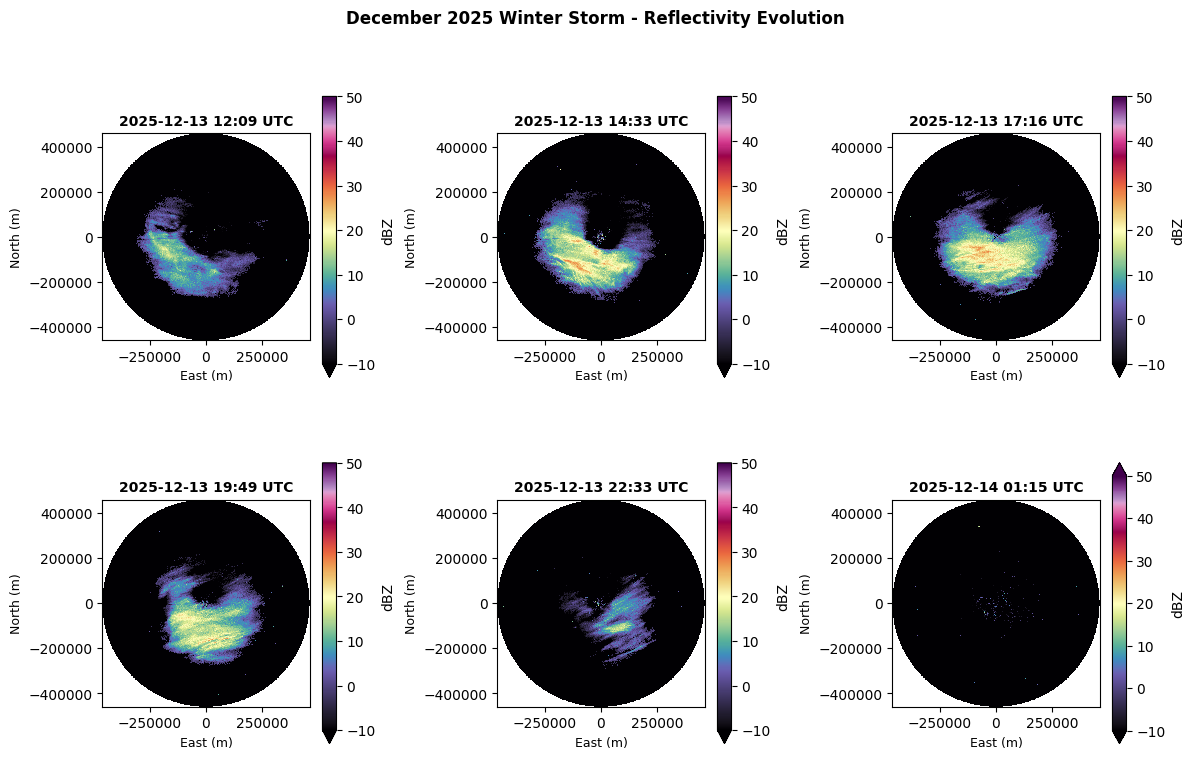
✓ Displayed storm evolution across 6 time steps
Computing Snow Accumulation#
Now comes the main event: converting reflectivity into snowfall accumulation.
The Process#
We’ll use the rain_depth() function with WSR-88D snow coefficients:
a = 75 (Marshall-Gunn)
b = 2.0
The function will:
Convert DBZH from dBZ to linear units
Apply the Z-S relationship: \(R = (Z/75)^{1/2.0}\)
Integrate precipitation rates over the
vcp_timedimensionReturn total liquid equivalent accumulation (mm)
Note
This computation happens lazily - the data only streams when we call .compute().
%%time
# Compute snow accumulation (liquid equivalent)
# Using WSR-88D snow coefficients (Marshall-Gunn 1958)
snow_depth_per_scan = rain_depth(
    storm_data.DBZH,
    a=75,  # WSR-88D snow coefficient
    b=2.0,  # WSR-88D snow coefficient
    t=None,  # Auto-compute from vcp_time dimension
)

# Sum over time to get total accumulation and load into memory
snow_accumulation = snow_depth_per_scan.sum(dim="vcp_time", skipna=True).compute()

print("\nSnow accumulation computed successfully")
print(f"Result shape: {snow_accumulation.shape}")
print(f"Dimensions: {snow_accumulation.dims}")
Actual QPE integration period: 0 days, 13 hours, 6 minutes
Time span: 2025-12-13T12:09:20 to 2025-12-14T01:15:42 UTC
Snow accumulation computed successfully
Result shape: (720, 1832)
Dimensions: ('azimuth', 'range')
CPU times: user 2.94 s, sys: 308 ms, total: 3.25 s
Wall time: 2.11 s
Geographic Visualization: Where Did the Snow Fall?#
Now let’s create a map showing snow accumulation across northern Illinois.
# Convert accumulation to inches for U.S. audience
snow_accumulation_inches = snow_accumulation * (1 / 25.4)

# Estimate snow depth (using 10:1 SLR)
snow_depth_inches = snow_accumulation_inches * 10

# KLOT radar location
klot_lat = 41.6044
klot_lon = -88.0847

# Create geographic map with cartopy
fig = plt.figure(figsize=(10, 8))
ax = plt.axes(
    projection=ccrs.LambertConformal(
        central_longitude=klot_lon, central_latitude=klot_lat
    )
)

# Set extent to cover radar domain (~250 km around radar)
ax.set_extent(
    [klot_lon - 3.5, klot_lon + 3.5, klot_lat - 2.5, klot_lat + 2.5],
    crs=ccrs.PlateCarree(),
)

# Add geographic features
ax.add_feature(cfeature.STATES, linewidth=1.5, edgecolor="black", zorder=3)
ax.add_feature(cfeature.COASTLINE, linewidth=1, zorder=3)
ax.add_feature(cfeature.LAKES, alpha=0.5, facecolor="lightblue", zorder=2)

# Plot snow accumulation using x/y coordinates (meters from radar)
# Transform x/y from radar-centered meters to lat/lon for plotting
if "x" in snow_depth_inches.coords and "y" in snow_depth_inches.coords:
    # Get x, y coordinates (in meters from radar)
    x_vals = snow_depth_inches.x.values  # 2D array
    y_vals = snow_depth_inches.y.values  # 2D array

    # Convert to approximate lat/lon (simple offset from radar location)
    # Note: This is approximate; for exact georeferencing use pyproj
    lon_vals = klot_lon + (x_vals / 111000) / np.cos(np.radians(klot_lat))
    lat_vals = klot_lat + (y_vals / 111000)

    # Plot with pcolormesh for geographic overlay
    p2, p98 = np.nanpercentile(snow_depth_inches.values, [2, 98])
    im = ax.pcolormesh(
        lon_vals,
        lat_vals,
        snow_depth_inches.values,
        cmap="Blues",
        vmin=0,
        vmax=max(p98, 1),
        transform=ccrs.PlateCarree(),
        zorder=1,
        alpha=0.8,
    )
    plt.colorbar(im, ax=ax, label="Est. Snow Depth (in)", shrink=0.7, pad=0.02)

# Mark radar location
ax.plot(
    klot_lon,
    klot_lat,
    marker="*",
    markersize=20,
    color="red",
    markeredgecolor="black",
    markeredgewidth=1.5,
    transform=ccrs.PlateCarree(),
    label="KLOT Radar",
    zorder=10,
)

# Add city markers
cities = {
    "Chicago": (41.8781, -87.6298),
    "Rockford": (42.2711, -89.0940),
    "Joliet": (41.5250, -88.0817),
}
for city, (lat, lon) in cities.items():
    ax.plot(
        lon,
        lat,
        marker="o",
        markersize=6,
        color="black",
        transform=ccrs.PlateCarree(),
        zorder=9,
    )
    ax.text(
        lon + 0.12,
        lat,
        city,
        fontsize=9,
        transform=ccrs.PlateCarree(),
        ha="left",
        fontweight="bold",
        bbox=dict(facecolor="white", alpha=0.7, edgecolor="none", pad=1),
    )

ax.gridlines(draw_labels=True, dms=True, x_inline=False, y_inline=False, alpha=0.3)
ax.legend(loc="upper right", fontsize=10)
ax.set_title(
    "December 13-14, 2025 Snow Accumulation\nNEXRAD KLOT (10:1 SLR)",
    fontsize=12,
    fontweight="bold",
)

plt.tight_layout()
plt.savefig(
    "snow_accumulation_map.png", dpi=150, bbox_inches="tight", facecolor="white"
)
plt.show()

print(f"\n✓ Figure saved. Color scale: 0 to {max(p98, 1):.1f} inches (98th percentile)")
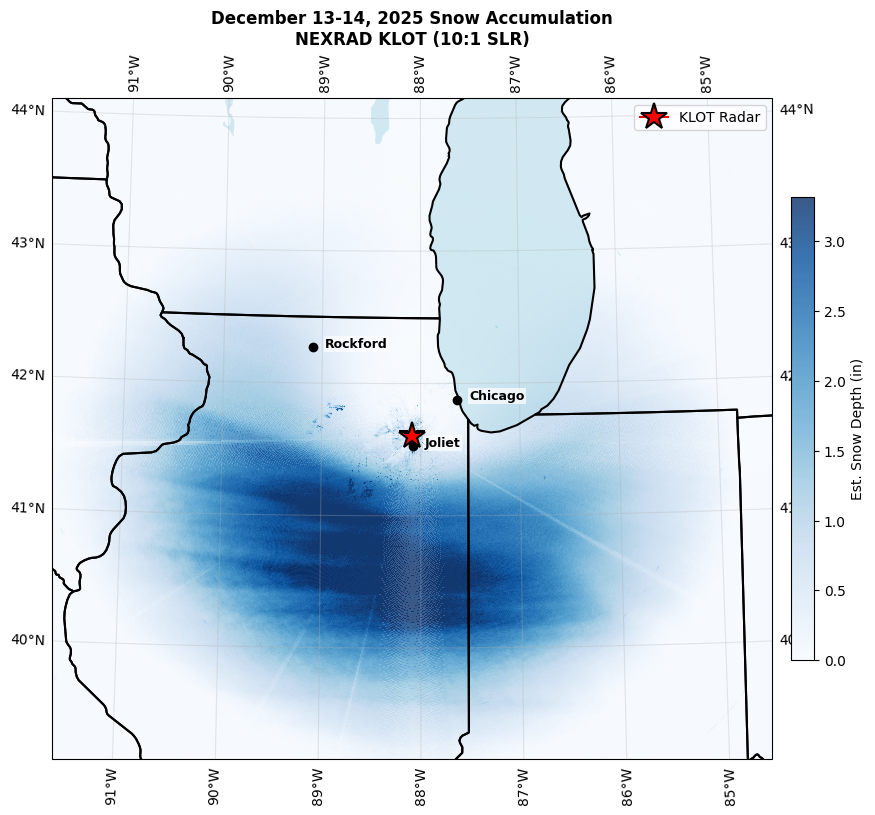
✓ Figure saved. Color scale: 0 to 3.3 inches (98th percentile)
Cross-Sections: Accumulation Profiles#
Let’s examine accumulation along transects through the domain:
fig, (ax1, ax2) = plt.subplots(1, 2, figsize=(12, 4))

# Radial profile (average across all azimuths)
range_km = snow_depth_inches.range.values / 1000
radial_profile = snow_depth_inches.mean(dim="azimuth", skipna=True)

ax1.plot(range_km, radial_profile.values, "b-", linewidth=2)
ax1.axvline(0, color="red", linestyle="--", linewidth=1.5, label="Radar", alpha=0.7)
ax1.set_xlabel("Distance from Radar (km)", fontsize=10)
ax1.set_ylabel("Est. Snow Depth (in)", fontsize=10)
ax1.set_title("Radial Profile (Azimuth Average)", fontsize=11, fontweight="bold")
ax1.legend(fontsize=9)
ax1.grid(alpha=0.3)
ax1.set_xlim(0, 230)
# Auto-scale y-axis based on data
ax1.set_ylim(0, max(radial_profile.max().values * 1.1, 0.5))

# Azimuthal profile at 100 km range
target_range_m = 100000
az_profile = snow_depth_inches.sel(range=target_range_m, method="nearest")

ax2.plot(az_profile.azimuth.values, az_profile.values, "g-", linewidth=2)
ax2.set_xlabel("Azimuth (degrees)", fontsize=10)
ax2.set_ylabel("Est. Snow Depth (in)", fontsize=10)
ax2.set_title("Azimuthal Profile at 100 km", fontsize=11, fontweight="bold")
ax2.grid(alpha=0.3)
ax2.set_xlim(0, 360)
# Auto-scale y-axis
ax2.set_ylim(0, max(float(az_profile.max(skipna=True).values) * 1.1, 0.5))
for az, label in [(0, "N"), (90, "E"), (180, "S"), (270, "W")]:
    ax2.axvline(az, color="gray", linestyle=":", alpha=0.5)
    ax2.text(az, ax2.get_ylim()[1] * 0.9, label, ha="center", fontsize=9)

plt.tight_layout()
plt.show()

print(f"Max radial accumulation: {radial_profile.max().values:.2f} inches")
print(
    f"Max azimuthal accumulation at 100 km: {az_profile.max(skipna=True).values:.2f} inches"
)
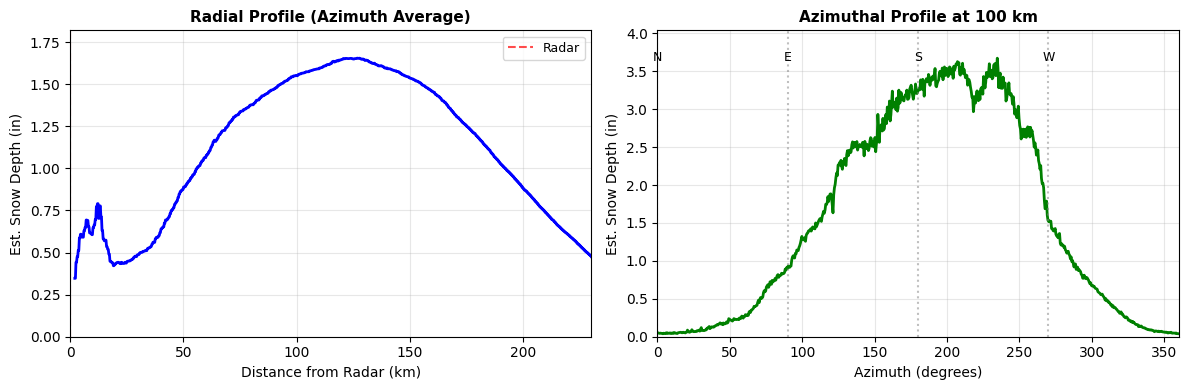
Max radial accumulation: 1.65 inches
Max azimuthal accumulation at 100 km: 3.67 inches
Scientific Integrity: Understanding Your Results#
Every radar-derived estimate has inherent uncertainty. Knowing these limits is what separates credible analysis from naive code execution.
Key Sources of Uncertainty#
Source |
Impact |
Notes |
|---|---|---|
Z-R coefficients |
±30–70% |
Snowflake density, size, and crystal habit vary with temperature and humidity |
Beam height |
Increases with range |
At far ranges the beam samples well above the surface; estimates most reliable within ~100 km |
Bright band |
Overestimation |
Melting snow produces artificially high reflectivity; QVPs help identify this |
Ground clutter / blockage |
Localized errors |
Buildings, terrain can block or reflect the beam |
SLR assumption |
±50%+ |
We used 10:1, but real SLR ranges from 5:1 (wet snow) to 30:1+ (dry, fluffy snow) |
Tip
For publications, include a statement like: “Radar-derived QPE estimates have typical uncertainties of ±30–50% for snow events (Roebber et al., 2003). Validation against surface observations is recommended.”
Validation Strategy (Future Work)#
To improve confidence in radar QPE:
Ground truth comparison:
CoCoRaHS volunteer observations
Automated ASOS/AWOS stations
Snowboard measurements
Multi-sensor fusion:
Combine radar with satellite (MRMS products)
Gauge correction factors
Model QPF for storm structure
Improved Z-S relationships:
Use polarimetric variables (ZDR, KDP) to classify snow type
Apply different coefficients for different hydrometeor classes
Adjust for temperature profiles
Tip
Research opportunity: Compare your radar estimates with official snowfall reports. Where do they agree? Disagree? Why might that be?
Summary: What You’ve Accomplished#
You just computed snowfall accumulation for an entire winter storm — from your laptop!
This is publication-quality analysis. Seriously. You now have the skills to analyze any winter storm in the 30+ year NEXRAD archive.
Skills You’ve Mastered#
QPE fundamentals:
Z-R relationships for rain vs snow
Time integration to compute accumulation
Liquid equivalent vs actual snow depth
Multi-VCP data handling:
Used
concat_sweep_across_vcps()for continuous time seriesUnderstood why radar switches VCPs during storms
Cloud-native workflows:
Connected to KLOT archive on OSN
Streamed only the data needed (sweep_0, storm window)
Computed accumulation without downloading files
Scientific visualization:
Geographic accumulation maps
Storm evolution time series
Radial and azimuthal profiles
Scientific integrity:
Z-R relationship variability
Beam height effects
Uncertainty quantification and communication
The Big Picture#
This workflow would have been:
Impossible 10 years ago (data not archived at this resolution)
Tedious 5 years ago (download hundreds of files, decode each one)
Trivial today (stream on-demand, compute in memory)
This is the power of FAIR, cloud-native data.
Next Steps: Extend Your Analysis#
Challenge Yourself
Ready to go deeper? Try these extensions:
Compare with ground truth: Download snowfall reports from CoCoRaHS and compare with radar estimates
Improve the Z-S relationship: Use ZDR and KDP for hydrometeor classification
Analyze storm structure: Compute QVPs to see vertical structure
Scale to other storms: Analyze the entire winter season (December-February)
References#
Z-R Relationships#
Marshall, J. S., & Palmer, W. M. (1948). The distribution of raindrops with size. Journal of Meteorology, 5(4), 165-166.
Marshall, J. S., & Gunn, K. L. S. (1958). Measurement of snow parameters by radar. Journal of Meteorology, 15(2), 209-215. (Used for WSR-88D snow algorithm)
Radar QPE Techniques#
Cifelli, R., Chandrasekar, V., Lim, S., Kennedy, P. C., Wang, Y., & Rutledge, S. A. (2011). A new dual-polarization radar rainfall algorithm: Application in Colorado precipitation events. Journal of Atmospheric and Oceanic Technology, 28(3), 352-364.
Gourley, J. J., et al. (2017). The FLASH Project: Improving the Tools for Flash Flood Monitoring and Prediction across the United States. Bulletin of the American Meteorological Society, 98(2), 361-372.
Snow-to-Liquid Ratios#
Roebber, P. J., Bruening, S. L., Schultz, D. M., & Cortinas Jr, J. V. (2003). Improving snowfall forecasting by diagnosing snow density. Weather and Forecasting, 18(2), 264-287.
Radar DataTree Framework#
Ladino-Rincón, A., & Nesbitt, S. W. (2025). Radar DataTree: A FAIR and Cloud-Native Framework for Scalable Weather Radar Archives. arXiv preprint arXiv:2510.24943. https://doi.org/10.48550/arXiv.2510.24943
Citation#
If you use this notebook or framework in your research, please cite:
Ladino-Rincón, A., & Nesbitt, S. W. (2025). Radar DataTree: A FAIR and Cloud-Native Framework for Scalable Weather Radar Archives. arXiv:2510.24943. doi:10.48550/arXiv.2510.24943
Tutorial created by the Radar DataTree team
Last updated: February 2025